Pages

Showing posts with label Studio J digital layouts. Show all posts

Monday, December 1, 2014

H2H Scrapbooking Challenge for December

It's time to celebrate! ...I am talking about your favorite holiday!  While I am sure that many of you love Christmas, that is not one of my favorite holidays! Actually it is Halloween but I decided to scrapbook Thanksgiving for this post because this holiday is rapidly becoming one of my most favorite holidays!

I love cooking for my small family and celebrating all that is blessed and wonderful about our life.  I am thrilled that I am able to finish a scrapbook layout before the 1st of December.  Thanks to the Close to My Heart November special, I was able to print a few layouts for only $5.00!

Here is my layout using the Studio J Pathfinding paper pack.  This paper pack is a brand new addition to Studio J and I am so grateful they decided to add several of the new paper packs to the program.


As you can see the Brill family includes a son and daughter-in-law plus two dogs!  My husband, and 'kids' had a relaxing weekend while I worked at the Bernina Sewing Center in Tampa, Fl.  Not to worry - I have several days off while they are at work!

Please join us and scrapbook your favorite holiday!  Add your linky here so we can all share your memories as well!

Monday, November 10, 2014

Lucky 5 on day 10

Holy Moly!  It is the 10th already!  This month is flying by...  Don't forget that the Lucky 5 special is for the entire month of November!


November marks the five-year anniversary of Studio J®, and that means it’s your lucky month, with five amazing ways to win through Studio J and Close To My Heart social media!
1. 25 % OFF ALL LAYOUTS – Throughout the month of November, all layouts purchased in Studio J are $5! That is a savings of over 25% off of retail!
2. FREE SURPRISE – This one involves sheer luck… every fifth order placed in Studio J during November receives a FREE surprise Close To My Heart accessory in its shipping box!
3. GOLDEN TICKET – You just might stumble upon a little extra something in your Studio J box. Five “golden tickets” will be sent out during the month of November with randomly selected Studio J print orders! This “golden ticket” is redeemable for one of Close To My Heart’s new D-ring albums* loaded with 10 Top Load Memory Protectors™.
4. CTMH FACEBOOK PAGE DRAWING – For a fourth way to win, simply create new, gorgeous layouts in Studio J, select your favorites, and then post pictures of them on Close To My Heart’s Facebook page using the hashtag ‪#‎ctmhlucky5‬. After November 30, five lucky winners will be selected from the entries based on their artistry and creativity and each of these winners will receive their own D-ring album loaded with 10 Top Load Memory Protectors!
5. INSTAGRAM DRAWING – And there is one last way to win: take your new Studio J artwork and post a picture of it on Instagram using the hashtag #ctmhlucky5. Just as it is with Facebook, after November 30, five lucky winners will be selected from the entries to receive their own D-ring album loaded with 10 Top Load Memory Protectors!

Here is my layout for the 10th of November! 

I am also entering my layout in this week's H2H Challenge.  This week is NO-ink week.  Please join us this week ans use up some of your paper OR better yet, create a quick layout in Studio J!  You will find the linky here.

A few  more layouts and I will be ready to send in my order!   Please come back on the 15th of November to see what layout I have completed using Studio J!


Wednesday, November 5, 2014

Lucky 5

To help celebrate the FIVE-year anniversary of Studio J, I will be posting my layout entries every FIVE days!


I love Studio J as an addition to my traditional scrapbooking.  It will not ever totally replace my love for paper, trims and buttons!  

How do I love thee?  Let me count the ways....  (My first 3)
1.  It is neat and clean - no mess to clean up or organize!
2.  I can scrap anywhere as long as I have an internet connection.
3.  I can "design' my layouts in Studio J and move and change things around until I am ready to cut it out in paper.

Here is another layout from my son's wedding album.  I am on a roll!


Come back on the 10th to see another layout I am currently working on.


Monday, September 15, 2014

Welcome to our FIRST Studio J Blog Hop

Welcome to the FIRST Studio J Blog Hop!  This month we are very small but we hope to grow as big as the SOTM Blog Hop group!  It is a circular hop and if you get lost along the way, you can always come back here to find the list of participants below:


September 2014 Studio J blog Hop "Anything Goes"

1. Adeline Brill - www.adeline-brill.blogspot.com

2. Marianne Hancock  www.thescrapbookchick.blogspot.com

3. Julie Sinnott - www.12X12travels.blogspot.ca

4. Heather Plotzke - www.heatherplotzke.blogspot.com

5. Rebecca Brown - www.showmescrapping.com

6. Jen Patrick- http://roxybonds-scrappin.blogspot.com

7. Traci Godbee- www.createwithtraci.com


If you have been hopping with us, then you have just arrived from Traci's blog here and saw her beautiful layout.

I just recently returned from a dream trip to Alaska.  We cruised out of Seattle and visited Ketchikan, Juneau, Skagway, Victoria, BC and stayed an extra day in Seattle.  It was awesome and we took over 800 pictures!  With that in mind I decided to start a Studio J layout before I left with a 15 photo well template.

  Here is my template below:

I did change  the title and added some journaling and the month but that is it!  I am so excited that I have at least one layout finished and on it's way!


Created in: Studio J
Kit: Timberline
Pattern:  Fab Fifteen
Kit Mix: 2

If you haven't tried Studio J, then just go to your favorite consultant's OBA and try it out. Just establish an account and try out a few layouts - they really do go together quickly! 

Check out below a screenshot of the workspace in Studio J.


Now it is time to move on to Marianne's blog here and check out her layout.  

Wednesday, August 27, 2014

Studio J Snippet #8

Well it is almost the end of August and sadly I did not meet my Studio J Challenge of 30 layouts.  But I have used Studio J more in the last two months than I have in the last two years!  I am so pleased with how some of my layouts have turned out and I look back at some of my previous layouts and see how much I have improved!

Studio J snippet #8 - Create a totally different look by changing the colors of a paper pack and creating a matching embellishment by mixing up the My Stickease elements.

Here is a layout I did for convention in 2012 in which I altered the colors of the paper pack and created a totally different design using the My Stickease.


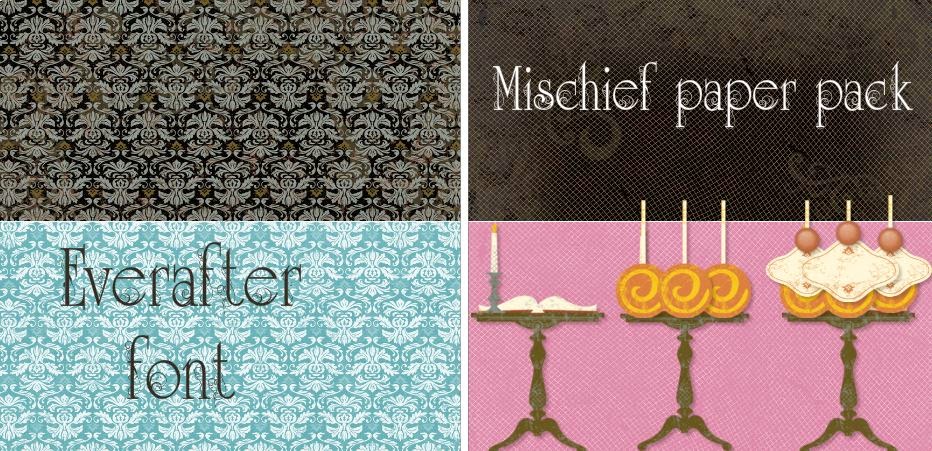
Here is the example I used to create the layout using the Mischief paper pack in Studio J.


I changed the color of the paper on the left from black to Lagoon and the color on the right from black to Cotton Candy.  I turned the lollipops stickers upside down and added a tag and a brad for the frosting and cherry!

I have also entered this layout in the H2H Challenge for this week "Inspired by ...Food!"  You can find the linky here.  Please join us - I am sure that you will find something to scrap about using a food theme!


Wednesday, August 20, 2014

Studio J snippet #7

It just seems like the summer is flying by!  All of the  kids are back in school here in the Tampa area.  At the end of the month, my husband and I are traveling to Alaska on the Pazzles cruise


I am quite excited and I have already started my scrapbook pages for when we return home.  I have one two page layout already finished and ready for photos. You can see the post here with the featured page.  I know that I am going to use 4 - 4 " x 6" photos and 3 - 3" x 3" to finish the layout.

Studio J snippet #7 - Use Studio J to plan your  photo picture experience.

So many times, I take random pictures and I can never use them in any layouts. With this layout I am ready with 15 photo wells!


I know I will have to take vertical as well as horizontal photos.  So many times I seem to take all of my photos horizontally and then I have have a hard time trying to fit them into a layout.  Now I am all ready  to go and finish the layout quickly when I return home.  Check back in the 2nd or 3rd week of September to see  the finished layout.

Here is another post where I used Studio J to plan out a layout for my workshop.
Check it out!

Wednesday, August 13, 2014

Studio J snippet #6

This week I combined my Studio J snippet with the H2H challenge of the week! This week's challenge is Inspired ...by a song.  I actually took this challenge literally and created a Studio J layout for another page in my son's wedding album.  My goal is to have this album completed by Christmas!

Studio J snippet #6 -when you have multiple pictures of one event, select a layout that features them in a sequence .

The "Stars Above" layout is perfect for this type pf layout.

Very little journaling is needed for this layout and so I selected the title of the song and a few lines of the lyrics.  An interesting tidbit I have to add is this child knew the names of all four of the Beatles by the time he was 3 years old!  SO it comes as no surprise that this song was selected for their wedding dance.

Please join in the fun with the H2H Challenge this month.  You can find the linky here.

Wednesday, August 6, 2014

Studio J Snippet #5

It is Wednesday again!  This past weekend, I spent time in the "NO Internet Prison"!  A lightning strike killed every piece of equipment that hooked us up to the world!

We now realize how we rely on the internet to complete many of our daily tasks! So my snippet today is all about quick and easy!

Studio J Snippet #5-"5 minute layout" When you are in a crunch for time, it is all about "drag and drop"..

I selected a collection- Surf's Up and a layout and dragged and dropped my photos and stickers.  Typed up some quick journaling and the layout is DONE in 5 minutes!


Enjoy!.... and another page is done for my son's wedding album.

Wednesday, July 30, 2014

Studio J Snippet #4

Hello Wednesday!

 It must be time for another "Studio J snippet".  Today I am back into the "No Limits" layout.  It is hard for me to get away from this because I can create my own pages as if I were working with paper!

"Studio J snippet #4" - Studio J offers paper packs that we do not sell in the actual paper form. 

 I found a video by the wonderful Am Ulen in which she featured the "True Friends" paper pack and I thought - I TOTALLY forgot about our animal paper pack!


So I created this layout of my favorite furry friend - Harley!


Harley is a rescue dog through Pet Finders.com and he had a few problems.  He is a Bichon and his original owner left him 10-12 hours a day all by himself.  We rescued him (or he rescued us!) and he is our best friend.  Here he is laying by the sliding glass door, usually behind the curtain!

I also found a free digital scrapbook kit here and used the font and quote from the kit to accent my page.


I am almost ready to submit my July Studio J order.  I am excited to finally get so many pages done and IN my scrapbooks!

Why don't you try it out here and see for yourself!


Monday, July 28, 2014

H2H Challenge

Another Monday and it is time for another H2H challenge.  One of the problems of taking a vacation is being able to create a layout or card without your paper crafting supplies BUT" ta...dah" - enter Studio J to the rescue!

The challenge is to use the Picture My Life collections or the My Crush collections for our artwork.  Well I was unable to be at home to finish my project (look for a post later this week) but I was able to create it in Studio J!  

Here is my PML collection using the Jubilee paper pack along with the "No Limits" layout in Studio J.


Once I received the printed layouts, I can cut them and put them in the appropriate Memory Protectors.

Here is the Memory Protectors Design 3 - 4 vertical photos and 4 horizontal photos or cards.

Memory Protectors Design 5 - 3 vertical photos  and 6 horizontal photos or cards.

Perfect to finish the pages for the "Summer Theme" of the layouts.

Thursday, July 24, 2014

07/23 Studio J snippet #3

Wow - this summer is just flying by...can you believe it?  It is time again for my Wednesday Studio J snippet #3?!

Snippet #3 - Add WORD ART to your layout to make it pop!

Yesterday I traveled to western New York to visit my family.  I had a 3 hour layover in the Atlanta airport.  So I parked myself in the "Juke Joint" and I had some lunch and worked on my Studio J layout.

One of my favorite ways to use Studio J is make a landscape picture using adjoining photo wells.  My husband took the photos of the gorgeous sunset in Key West and I wanted to create one photo on the right.

Here is the original "Close Up" Studio J layout. 


I added the one photo to both of the photo wells on the right.  I nudged each into place to make one large landscape photo.  I selected both of the photos and moved them to the left to line them up with the edge of the paper.  There was an empty area and I filled it in with the journaling strip and matching paper.  I layered the stickease and added the stitching lines to create the accents on the page.


To create the overlay with the Word Art, I added a photo well, removed the mat and placed it on the page.  You can find the FREE Word Art here

I am thrilled, another 2 page layout DONE! 

Wednesday, July 9, 2014

NEW!! "Studio J snippets"

Starting this week, each Wednesday, I will post a 'snippet' about Close to My Heart's fabulous on-line digital program called Studio J.  Their are so many versatile uses for this program. I dabble in digital scrapbooking using Adobe Photoshop Elements 12 BUT this program is so easy that it takes less time for me to create a quick layout.

Snippet #1 - Create a collage with photo wells and the "No Limits"  pattern.

The first 'snippet' I want to share is creating your own photo wells using Studio J. Check out this You-Tube video.


I started working on my son's wedding album with all of the 600+ photos. My biggest dilemma...... where to begin!'


The first step was to create a "Wedding Photos" album.  Then I decided to try and create this collage using the "No Limits" pattern and following the suggestions from the video.  

I still may tweak it a bit but at least it is saved and ready to go in the album until I am ready to place the order.

Why don't you give it a try?  you can log onto my site here and try it out.  It is under the PRODUCTS dropdown menu- the 3rd one down.  Let me know what you think by leaving a comment.